

WordPress 7 beta is shaping up to be the biggest release since Gutenberg landed in 5.0. With an always-iframed block editor, real-time collaboration, native AI integration, and a refreshed admin UI, there were plenty of reasons to expect breakage especially for a custom theme like mine. I decided to install the WordPress 7 beta locally and find out for myself.
My WordPress 7 Beta Testing Setup
Before touching anything in production, I did things the responsible way:
- Backed up my production site. Database and files, the full snapshot.
- Spun up a local copy using a Docker starter with the Dockerfile modified to use
wordpress:beta-7.0-php8.3-fpmimage. - Activated plugins one by one to isolate any issues.
- Switched themes, from my custom theme to default Twenty Twenty-Five first, then back. Just to make sure nothing broke in either direction.
The whole process was uneventful, which is exactly what you want from a major version upgrade.
The Verdict: WordPress 7 Beta Just Works
My custom theme, a classic PHP theme with custom page templates, editor scripts, and a portfolio post type, came through without any major issues. I was able to edit all of my custom page templates and save without problems. No white screens, no fatal errors, no lost data.
The only things I noticed were minor cosmetic issues: a few button colors in the editor didn’t match my theme’s palette anymore, likely due to the updated admin design system. Nothing that breaks functionality, just a bit of CSS cleanup for a rainy afternoon.
What Stood Out in WordPress 7 Beta
It feels fast. This is subjective and I didn’t run formal benchmarks, but the admin dashboard and block editor both felt snappier. WordPress 7.0 ships with reduced JavaScript overhead, smarter caching, and improved block rendering under the hood and the difference is noticeable. Page loads in the editor felt quicker, and switching between templates didn’t have the usual half-second hesitation. Just a disclaimer, my site only runs 6 active plugins, which is lightweight. The more plugins and customizations a site has, the more likely it is to run into bugs or feel slower than my experience.
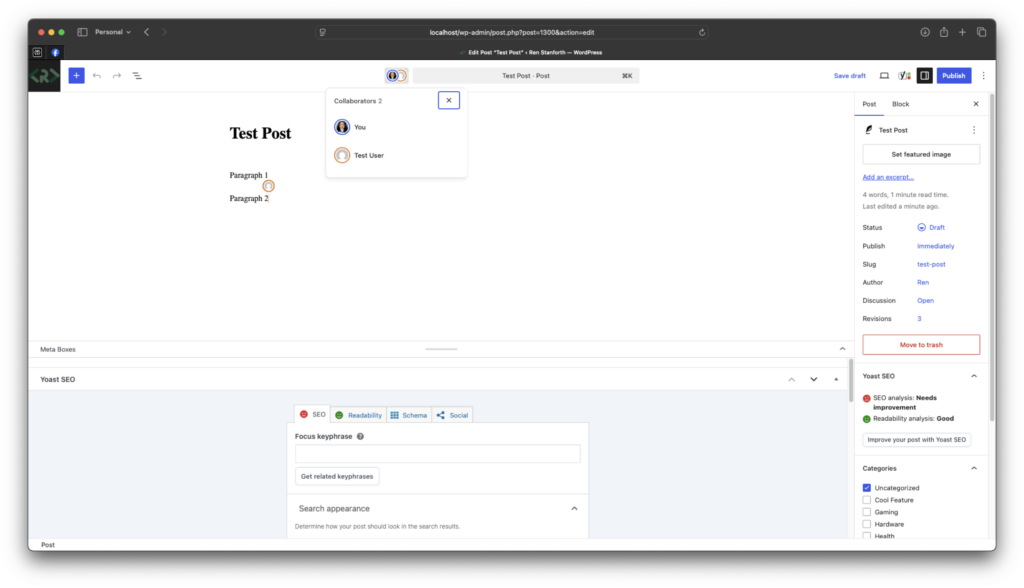
Real-time collaboration is impressive. Edit the same post in two different browsers using different users and you’ll see live cursors and changes syncing between them, though only one user should take over at a time like Google Docs-style. For solo developers this is a novelty, but for teams or client handoffs it could be genuinely useful.
That said, it comes with limitations worth knowing about:
- Classic meta boxes disable it. If a plugin or theme registers old-school PHP meta boxes on a post type, collaboration is automatically turned off for that post to prevent data loss. Developers need to migrate to registered post meta with
show_in_restenabled. - Same-block editing can get quirky. Two people editing the exact same paragraph at the same time can produce unexpected results like insertions or cursor jumps. It works best when collaborators are working on different blocks.
- Plugin compatibility varies. So if bugs appear from third-party plugins, we should wait for them to update to a stable version.
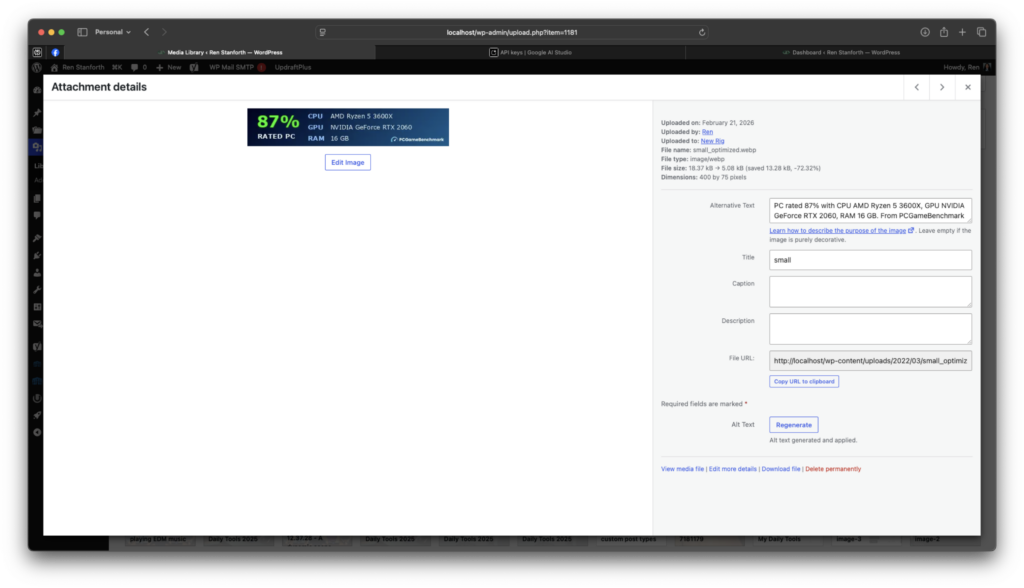
AI integration is real and useful. The WordPress 7 beta ships with a native AI client that’s provider-agnostic. You can plug in your own API key from Google, OpenAI, or Anthropic. I connected my Google AI key and used it to auto-generate ALT text for images in the Media Library. It worked well and saved me time of writing descriptions for test uploads. This alone could be worth the upgrade for content-heavy sites.
The Admin Dashboard Looks Different
The admin UI has been refreshed. Layouts are a bit more modern, some screens use the new DataViews component instead of the classic list tables, and the overall feel is cleaner. But everything is still where you expect it to be. If you’ve used WordPress for any length of time, you’ll orient yourself in seconds.
If you maintain a custom theme or plugins, YES! Now is the time to test it around. The final release is scheduled for April 9, 2026, which is just around the corner (as of this writing, of course), giving you just enough time to catch issues before your users or clients hit them. My experience suggests that well-structured classic themes survive the upgrade without drama, but your mileage will depend on how deeply your code hooks into the editor or admin list tables. Also, keep in mind that your server should meet the minimum requirements: PHP 7.4 or higher, and a supported database version.
The safe recipe:
- Back up production.
- Test locally or on staging.
- Activate plugins one at a time.
- Switch themes back and forth.
- Open your custom page templates in the editor and hit Save.
- Resave settings such as permalinks.
- Debug mode should also be enabled.
If all items pass, you’re probably in good shape. The WordPress 7 beta has been surprisingly stable for me. And if you’ve been putting off testing, now’s the time before the final release drops.